How to Handle a Sudden Drop in Map Rankings After a Site Redesign
I remember the morning I launched my first major site redesign. I sat there with my coffee, feeling like a genius because the new layout was sleek, the fonts were modern, and it loaded in the blink of an eye. But by noon, my smugness turned into a cold, sinking pit in my stomach. I checked our local rankings, and we hadn’t just dropped a few spots—we had completely vanished from the map pack. My phone, which usually buzzed with leads every hour, stayed silent. It was a brutal realization that Google doesn’t care how pretty your website is if you accidentally break the technical bridge between your site and your business listing.
Stop Panicking and Start Auditing Your New Site
If you are staring at a flatline in your dashboard right now, I’ve been exactly where you are. Your first instinct might be to start changing your business hours or spamming photos into your profile, but please, don’t do that. Usually, a sudden drop happens because the ‘handshake’ between your website and your Google Business Profile got severed during the redesign. We need to look at your overall map health to see exactly where the signal dropped. One of the biggest mistakes I made early on was changing my service page URLs without setting up proper redirects. I thought Google was smart enough to figure it out; I was wrong. I effectively told the algorithm that the business it used to trust no longer existed.
Is a site redesign actually enough to kill your map visibility?
You might be skeptical that a few CSS changes or a new WordPress theme could tank your local reach. The truth is that your website acts as the primary ‘anchor’ for your local authority. According to the annual Local Search Ranking Factors study by Moz, on-page signals like your name, address, phone number (NAP) and keyword relevance account for about 16% of how Google decides to rank you in the map pack. If your developer stripped out your schema markup or changed your footer information, your complete maps seo checklist is now broken. Have you ever noticed your leads drying up the second a ‘minor’ site update went live? I’d love to hear if I’m the only one who has felt that specific brand of panic. Today, we are going to dive into fixing your map health when clicks drop so you can reconnect those dots. This isn’t a permanent death sentence for your business; it is a technical puzzle that we are going to solve by going back to a solid maps seo checklist that respects what the algorithm actually wants to see.
Rebuild the Digital Bridge Between Your Site and Maps
Fixing a ranking drop isn’t about hope; it’s about forensic evidence. When you launch a new site, you essentially rebuild the tracks of a railroad while the train—Google’s crawler—is still trying to run. If the tracks don’t align perfectly at the junction, the train derails. I once spent three sleepless nights wondering why a high-end dental clinic I worked with vanished from the top three spots after a gorgeous redesign. The issue wasn’t the content; it was a fancy JavaScript footer that hid their phone number from Google’s scraper. To the algorithm, the business suddenly became unverified because it couldn’t find the ‘NAP’ (Name, Address, Phone) data in the source code. These are the map health errors sabotaging your local traffic that happen when aesthetics override technical requirements.
Audit Your Schema for Ghost Code
Your new WordPress theme likely promised to be ‘SEO ready,’ but in the world of local search, that is often a hollow marketing term. If you’ve recently swapped themes, your specialized LocalBusiness JSON-LD code might be sitting in a digital trash bin. You must manually verify that your website is still feeding Google the structured data it needs. Following a step-by-step map optimization guide for better local rankings is the only way to ensure your coordinates, business type, and service area are hard-coded into your header. Think of schema as the GPS coordinates for Google’s bots; without them, they are just wandering around your pretty new home page without knowing where the front door is. I’ve seen profiles recover in 72 hours just by re-injecting the correct schema that the new developer forgot to port over.

Stitch Your Service Pages Back Together
When you change your site structure, your old service pages—the ones that Google Maps used to ‘read’ to understand what you do—often end up with new URLs. If your Google Business Profile (GBP) is still pointing to an old page that now leads to a 404 error, your authority is leaking like a broken pipe. You need to audit every single link in your google listing checklist to ensure they land on live, high-performing pages. I remember a plumber who lost 40% of his emergency leads because his ‘Water Heater Repair’ link on his profile was pointing to a page he had renamed to ‘Hydronic Systems.’ Google lost the keyword connection, and his ranking died. Redirects are your best friend here, but a clean, direct link to your primary service page is always the gold standard for map health.
Verify Your NAP is Actually Readable
It sounds elementary, but developers love to ‘stylize’ contact information. If your address is inside an image or a complex SVG file, Google might not be able to confirm it matches your listing. Every second your site data and your profile data are out of sync, you lose ‘trust points’ in the algorithm. We recently focused on map health signals to triple our service area clicks by ensuring that the footer data on every single sub-page was identical to the Google listing down to the comma. If your profile says ‘Suite 100’ and your new site says ‘#100,’ fix it today. This technical handshake is the most common point of failure in any redesign, and it is the easiest one to repair if you stop looking at the design and start looking at the data.
While most SEO gurus tell you to go out and hunt high-authority guest posts, I’ve found that traditional backlinks often fail your local ranking because they lack geographic relevance. Google isn’t just looking for how ‘famous’ your site is; it’s looking for how deeply rooted you are in your specific zip code. In my experience, a link from a local chamber of commerce or even a neighborhood blog is worth ten times more than a generic tech link when it comes to the map pack. If you’re following a standard google listing checklist, you might be missing these hyper-local connections that prove you actually exist in the physical world.
How does Google’s neural matching impact your local service pages?
Advanced users often ask if the actual words on the page matter as much as they used to. The answer is yes, but not in the way you think. According to the Local Search Ranking Factors study by Whitespark, behavioral signals and on-page entity associations are now heavy hitters. This means Google’s AI is trying to match the intent of the searcher to the content of your redesigned site. If your new copy is too ‘marketing-heavy’ and loses the raw, local terminology people actually use, you’ve effectively blinded the algorithm to your expertise.
Why your map health score is lying to you
Here is a hard truth: you can have a perfect technical score in an audit tool and still be invisible in search results. This is because most map health audits ignore the one factor that actually moves the needle: user engagement. If your redesign made your phone number harder to find or your ‘Get a Quote’ button is now buried under a heavy hero image, your conversion rate will tank. Google sees that users land on your page from the map and then quickly bounce back to the search results. To the algorithm, that’s a signal that your business isn’t the best answer, regardless of how clean your code is.
The trap of the primary category shift
One of the most common mistakes I see during a site overhaul happens when a business decides to ‘rebrand’ their service offerings. I once saw a plumbing company change their primary focus on their monitoring map health plan from ‘Emergency Plumber’ to ‘Luxury Bath Remodeler’ because it sounded more profitable. They lost 80% of their emergency calls overnight. You must ensure your site’s H1 tags and your business profile’s primary category are in a perfect, unshakeable marriage.  Dealing with these map health errors sabotaging your local traffic requires you to look past the pretty colors and focus on the data of user behavior. Have you ever fallen into this trap of prioritizing aesthetics over search intent? Let me know in the comments.
Keep Your Local Authority Alive Long After the Launch
Once the dust settles on your site redesign, the real work of maintenance begins. I have seen too many businesses climb to the top of the local pack only to slide back into obscurity because they treated their SEO like a one-time project. Local search is a moving target, and if you aren’t actively monitoring map health, your competitors will eventually eat your lunch. I make it a habit to check my proximity reach every Monday morning. It’s not just about seeing if you are #1; it’s about seeing where you are #1. If your visibility is shrinking toward your physical office, that is a red flag that your site’s local authority signals are weakening.
The Tools That Actually Save My Sanity Every Week
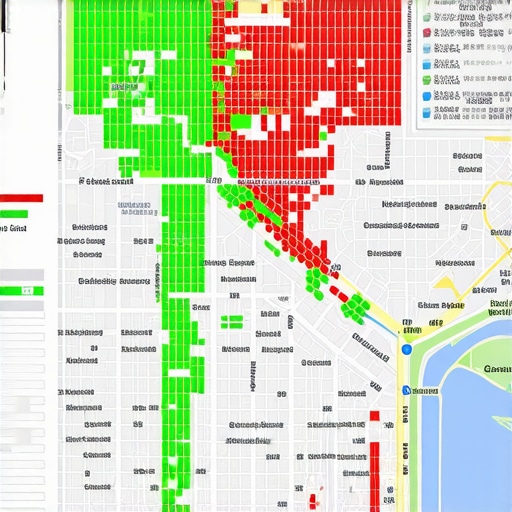
I don’t believe in using twenty different apps; I believe in using three that actually work. First, I use Local Falcon or BrightLocal for geo-grid tracking. Standard rank trackers that give you a single number for a city are useless because they don’t account for how proximity fluctuates. I need to see a 13×13 grid of my service area to know exactly where my ‘digital fence’ ends. Secondly, I use the Google Search Console ‘Performance’ report specifically filtered for ‘Map’ results. This is where you stop guessing your map health and see the hard data of how many people clicked the ‘Directions’ button versus the ‘Website’ button. If your site redesign was successful, your website clicks should rise without cannibalizing your phone calls.
How can I keep my map rankings high over the long haul?
Maintenance is about consistency, not intensity. I recommend a monthly audit using a your complete maps seo checklist to ensure no one has accidentally changed a meta description or broken a schema tag. You should also be looking at your justifications. According to Joy Hawkins, a leading expert at Sterling Sky and a frequent contributor to the Local Search Ranking Factors study, Google’s ‘justifications’—those snippets in the map pack that say ‘Their website mentions [keyword]’—are massive drivers of click-through rates. To maintain these, you need to keep your blog active with hyper-local content. If you stop posting, Google stops finding fresh justifications to show potential customers, and your mastering map optimization essential seo checklist for local growth will start to fail you.
What the Future of Local Search Looks Like in 2026
As we look toward the next couple of years, the trend is shifting heavily toward AI-driven entity verification. Google isn’t just reading your keywords anymore; it’s looking for proof of physical activity. This is why I tell my clients to focus on map health signals to triple our service area clicks, such as uploading geotagged photos directly from the mobile app while at a job site. In the near future, expect the ‘Map Pack’ to become even more interactive, potentially integrating real-time AI chat based on your website’s FAQ section. If your site isn’t structured to feed that AI, you’ll be left behind. You must follow a step-by-step map optimization guide for better local rankings that prioritizes structured data and mobile-first responsiveness. Don’t wait for your rankings to drop before you start looking at these advanced metrics. My best advice? Go into your Google Business Profile right now and audit your ‘Secondary Categories.’ Most businesses pick one and forget the rest, but those secondary slots are where you find the hidden traffic your competitors are ignoring.
Stop Prioritizing Aesthetics Over Your Map Signals
If I could go back to my first major site redesign, I’d tell myself that code beats colors every single time. One of the biggest lightbulb moments for me was realizing that developers build for humans, but local search algorithms build for verification. If you do not fix broken local schema immediately after your site goes live, you are essentially hiding your front door from Google. I have learned that a maps seo checklist isn’t a suggestion; it is the infrastructure of your digital presence. Don’t assume your theme handles the technical handshake between your site and your listing—it rarely does. I also discovered that speed is great, but if your site loads in half a second and your NAP data is invisible to a scraper, you’re just failing faster than everyone else.
My Go-To Kit for Maintaining Peak Map Health
I don’t leave my local lead generation up to chance, and you shouldn’t either. To keep your visibility stable, I recommend a stack that focuses on real-world movement. First, use Local Falcon to see your proximity grid; it’s the only way to know if your digital fence is shrinking. Secondly, always cross-reference your google listing checklist against your Search Console performance data to ensure clicks are turning into actions. I trust the insights from experts like Joy Hawkins and the team at Sterling Sky because they test these theories on actual local profiles. By monitoring map health weekly, you catch those tiny discrepancies before they turn into a full-blown ranking disaster.
Reclaim Your Spot on the Map Pack Today
It’s easy to feel like you’re shouting into a void when your rankings drop after a big project. But remember that local search is a game of consistency. If you follow a dedicated map optimization guide and keep your technical signals sharp, you will climb back up. You’ve done the hard work of building a reputable business; now it’s just about making sure the algorithm recognizes your authority again. Your map health is a living thing—feed it with accurate data and watch your phone start ringing again. Have you ever noticed your leads drying up right after a minor site update or a theme change? Let me know your experience in the comments below.